> ## Documentation Index
> Fetch the complete documentation index at: https://docs.agen.co/llms.txt
> Use this file to discover all available pages before exploring further.
# Rollout Playbook
> The recommended path from a pilot Mac to enforced policy across a fleet — what to do in each phase, what evidence to look for, and how to promote rules without breaking developer workflows.
 A rollout that starts with blocking generates a queue of angry tickets and gets
switched off. A rollout that starts with watching produces the evidence you need
to block the right things. This is the sequence that works.
This page is for whoever owns AgenShield for the organization. Developers
should read [Working with your agents](../using/working-with-agents.mdx).
## The five phases
Configure posture in the Frontegg Portal **before** any Mac enrolls.
Prove install, approvals, and protection work in your environment.
Deploy widely with nothing blocked. Collect two weeks of real activity.
Approve what is legitimate; write narrow rules for what is not.
Never fleet-wide in one step.
## Phase 1 — Prepare the tenant
Decide these in the [Frontegg Portal](https://portal.frontegg.com) first. None
of them touch an endpoint.
| Decision | Recommendation for a first rollout |
| ------------------------ | ---------------------------------------------------------------------------------------------------------------------------------- |
| Default enforcement mode | **`monitor`.** Change this only when you have evidence. |
| Which agents to govern | Start with the one your team actually uses most — Claude Code, Cursor, Codex CLI, Gemini CLI, or any other agent from the catalog. |
| Redaction patterns | Add any organization-specific credential formats now, so they are stripped from day one. |
| Network inspection | Leave **off** initially. Turn it on later if you need to see request contents. |
| Skill governance | Start in observe-only; move to approval once you know what is in use. |
Then create an [**install campaign**](../deployment/campaigns.mdx). It produces the
install link your rollout channel distributes, plus the ready-made configuration
profile and installer package for a managed fleet. The token only authorizes
enrollment, is revocable, and is not an admin credential — so it is safe to hand
to a device management system or an onboarding doc.
## Phase 2 — Pilot on a handful of Macs
Pick 3–5 developers who use AI agents heavily and will tell you when something
feels wrong.
Follow the [Quickstart](../getting-started/quickstart.md) on each, or the
[MDM guide](../deployment/mdm/overview.mdx) if the fleet is managed. What
you are proving:
* the install completes and the Mac enrolls
* the three macOS approvals land — pre-approved by MDM, or granted by hand
* the agents on the Mac work normally under the received policy
* activity from that Mac appears in the Frontegg Portal
Fix anything that surfaces here. It is far cheaper than fixing it across 200
machines.
## Phase 3 — Roll out in monitor mode
Deploy to the wider group with the default mode still `monitor`. Nothing is
blocked. Let people work normally for **at least two weeks** — long enough to
capture a release cycle, a dependency upgrade, and someone's unusual workflow.
What you are collecting:
| Question | What the evidence tells you |
| ------------------------------------------------- | --------------------------------------------------------- |
| What do agents actually execute? | The real command surface, not the one you assumed |
| Which hosts do they need? | Package registries, model APIs, and internal services |
| Which files do they read? | Whether they are near credentials, keys, or customer data |
| Which skills and connectors are loaded? | The extension surface you did not know you had |
| Does inspected traffic carry credential patterns? | Where secrets are actually leaking |
[Telemetry](../configuration/telemetry.mdx) is where all of that is collected, and
[Enrolled devices](../deployment/devices.mdx) tells you whether the fleet is actually
reporting. Resist the urge to write rules during this phase — incomplete
evidence produces brittle rules.
## Phase 4 — Turn evidence into rules
Now work through what you saw. The principle: **narrow rules scoped to a specific
agent**, never broad global blocks.
| What you observed | What to do |
| ----------------------------------------------- | --------------------------------------------------------------------- |
| Agent reaches required vendor and registry APIs | Add agent-scoped allow rules for those hosts |
| Agent reaches something unexpected | Add the deny in **monitor** first; confirm nothing legitimate matches |
| Agent reads credential files | Deny scoped to that agent, that path, that operation |
| Agent launches a risky child tool | Rule scoped to the agent, not a global command ban |
| An unknown skill appears on many Macs | Review it once, then approve or block it for everyone |
| Lots of harmless denials in the evidence | Narrow the rule's scope — do not widen the allow |
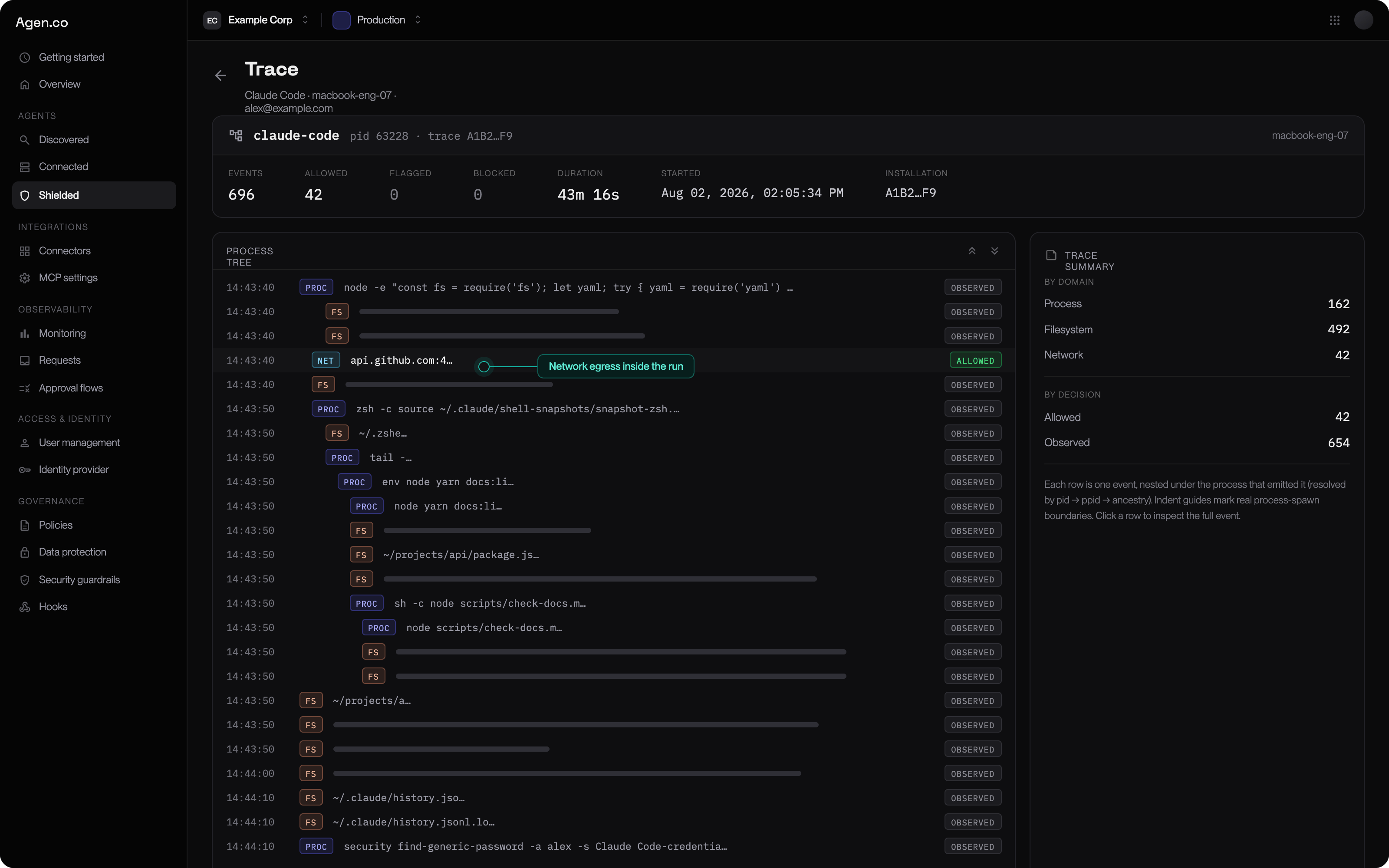
Use the trace view rather than event counts. One trace shows the root agent, the
child command, the file it read, the request it made, and the decision — which is
usually enough to tell "legitimate" from "worth blocking" at a glance.
A rollout that starts with blocking generates a queue of angry tickets and gets
switched off. A rollout that starts with watching produces the evidence you need
to block the right things. This is the sequence that works.
This page is for whoever owns AgenShield for the organization. Developers
should read [Working with your agents](../using/working-with-agents.mdx).
## The five phases
Configure posture in the Frontegg Portal **before** any Mac enrolls.
Prove install, approvals, and protection work in your environment.
Deploy widely with nothing blocked. Collect two weeks of real activity.
Approve what is legitimate; write narrow rules for what is not.
Never fleet-wide in one step.
## Phase 1 — Prepare the tenant
Decide these in the [Frontegg Portal](https://portal.frontegg.com) first. None
of them touch an endpoint.
| Decision | Recommendation for a first rollout |
| ------------------------ | ---------------------------------------------------------------------------------------------------------------------------------- |
| Default enforcement mode | **`monitor`.** Change this only when you have evidence. |
| Which agents to govern | Start with the one your team actually uses most — Claude Code, Cursor, Codex CLI, Gemini CLI, or any other agent from the catalog. |
| Redaction patterns | Add any organization-specific credential formats now, so they are stripped from day one. |
| Network inspection | Leave **off** initially. Turn it on later if you need to see request contents. |
| Skill governance | Start in observe-only; move to approval once you know what is in use. |
Then create an [**install campaign**](../deployment/campaigns.mdx). It produces the
install link your rollout channel distributes, plus the ready-made configuration
profile and installer package for a managed fleet. The token only authorizes
enrollment, is revocable, and is not an admin credential — so it is safe to hand
to a device management system or an onboarding doc.
## Phase 2 — Pilot on a handful of Macs
Pick 3–5 developers who use AI agents heavily and will tell you when something
feels wrong.
Follow the [Quickstart](../getting-started/quickstart.md) on each, or the
[MDM guide](../deployment/mdm/overview.mdx) if the fleet is managed. What
you are proving:
* the install completes and the Mac enrolls
* the three macOS approvals land — pre-approved by MDM, or granted by hand
* the agents on the Mac work normally under the received policy
* activity from that Mac appears in the Frontegg Portal
Fix anything that surfaces here. It is far cheaper than fixing it across 200
machines.
## Phase 3 — Roll out in monitor mode
Deploy to the wider group with the default mode still `monitor`. Nothing is
blocked. Let people work normally for **at least two weeks** — long enough to
capture a release cycle, a dependency upgrade, and someone's unusual workflow.
What you are collecting:
| Question | What the evidence tells you |
| ------------------------------------------------- | --------------------------------------------------------- |
| What do agents actually execute? | The real command surface, not the one you assumed |
| Which hosts do they need? | Package registries, model APIs, and internal services |
| Which files do they read? | Whether they are near credentials, keys, or customer data |
| Which skills and connectors are loaded? | The extension surface you did not know you had |
| Does inspected traffic carry credential patterns? | Where secrets are actually leaking |
[Telemetry](../configuration/telemetry.mdx) is where all of that is collected, and
[Enrolled devices](../deployment/devices.mdx) tells you whether the fleet is actually
reporting. Resist the urge to write rules during this phase — incomplete
evidence produces brittle rules.
## Phase 4 — Turn evidence into rules
Now work through what you saw. The principle: **narrow rules scoped to a specific
agent**, never broad global blocks.
| What you observed | What to do |
| ----------------------------------------------- | --------------------------------------------------------------------- |
| Agent reaches required vendor and registry APIs | Add agent-scoped allow rules for those hosts |
| Agent reaches something unexpected | Add the deny in **monitor** first; confirm nothing legitimate matches |
| Agent reads credential files | Deny scoped to that agent, that path, that operation |
| Agent launches a risky child tool | Rule scoped to the agent, not a global command ban |
| An unknown skill appears on many Macs | Review it once, then approve or block it for everyone |
| Lots of harmless denials in the evidence | Narrow the rule's scope — do not widen the allow |
Use the trace view rather than event counts. One trace shows the root agent, the
child command, the file it read, the request it made, and the decision — which is
usually enough to tell "legitimate" from "worth blocking" at a glance.
 [Rules and policy](../configuration/policies.mdx) covers how a rule is built from
grants; [Agent resources](../configuration/agent-resources.mdx) covers the skills and
connectors, which are approved rather than ruled on.
## Phase 5 — Promote to enforcement
Promote **one rule at a time**. A rule's own mode overrides the fleet default, so
you can leave everything in `monitor` and turn on exactly one rule.
For each rule:
1. Promote it to `enforce` in the Frontegg Portal.
2. Wait a full working day.
3. Check the Frontegg Portal for blocks against that rule.
4. Legitimate blocks mean the rule is too broad — narrow it and repeat.
Once a cluster of rules is stable, consider moving the fleet default from
`monitor` to `audit` — deny rules block, anything unmatched is still allowed.
Move to `enforce`, where only explicitly permitted activity is allowed, only when
your allow rules genuinely cover normal work.
See [Enforcement modes](../configuration/enforcement-modes.mdx) for the exact
semantics of each mode.
## Keeping it running
The loop does not stop after the first enforced rule.
| Review | Trigger | Action |
| --------------------- | ---------------------------------------------------- | -------------------------------------------------- |
| Open alerts | New alert, or a daily security review | Acknowledge, resolve, or convert into a rule |
| New or changed skills | A skill appears or its content changes | Approve, block, or ask for a re-review |
| Network outliers | An unexpected host, a volume spike, a secret pattern | Allow, deny, inspect, or extend redaction |
| Endpoint health | Missing check-in, inactive extension, stale policy | Repair the endpoint, or re-enroll it |
| Policy impact | High denial counts, or a developer complaint | Narrow the rule's scope or step it back to monitor |
## Common mistakes
* **Starting in `enforce`.** You will block legitimate work you did not know
existed, and lose the room to iterate.
* **Broad global rules.** "No agent may run `curl`" breaks more than it protects.
Scope to the agent and the specific case.
* **Skipping the pilot.** macOS approval behavior varies with your MDM and any
other security software present. Find that out on 5 machines, not 200.
* **Promoting several rules at once.** When something breaks you will not know
which one did it.
* **Treating monitor as "not secure yet".** Visibility into what your AI agents
are doing is already more than most organizations have.
## Next
Exact semantics of monitor, audit, and enforce.
Zero-touch rollout with no prompts on the endpoint.
Building a rule out of grants, and getting it to the fleet.
The evidence every phase above depends on.
[Rules and policy](../configuration/policies.mdx) covers how a rule is built from
grants; [Agent resources](../configuration/agent-resources.mdx) covers the skills and
connectors, which are approved rather than ruled on.
## Phase 5 — Promote to enforcement
Promote **one rule at a time**. A rule's own mode overrides the fleet default, so
you can leave everything in `monitor` and turn on exactly one rule.
For each rule:
1. Promote it to `enforce` in the Frontegg Portal.
2. Wait a full working day.
3. Check the Frontegg Portal for blocks against that rule.
4. Legitimate blocks mean the rule is too broad — narrow it and repeat.
Once a cluster of rules is stable, consider moving the fleet default from
`monitor` to `audit` — deny rules block, anything unmatched is still allowed.
Move to `enforce`, where only explicitly permitted activity is allowed, only when
your allow rules genuinely cover normal work.
See [Enforcement modes](../configuration/enforcement-modes.mdx) for the exact
semantics of each mode.
## Keeping it running
The loop does not stop after the first enforced rule.
| Review | Trigger | Action |
| --------------------- | ---------------------------------------------------- | -------------------------------------------------- |
| Open alerts | New alert, or a daily security review | Acknowledge, resolve, or convert into a rule |
| New or changed skills | A skill appears or its content changes | Approve, block, or ask for a re-review |
| Network outliers | An unexpected host, a volume spike, a secret pattern | Allow, deny, inspect, or extend redaction |
| Endpoint health | Missing check-in, inactive extension, stale policy | Repair the endpoint, or re-enroll it |
| Policy impact | High denial counts, or a developer complaint | Narrow the rule's scope or step it back to monitor |
## Common mistakes
* **Starting in `enforce`.** You will block legitimate work you did not know
existed, and lose the room to iterate.
* **Broad global rules.** "No agent may run `curl`" breaks more than it protects.
Scope to the agent and the specific case.
* **Skipping the pilot.** macOS approval behavior varies with your MDM and any
other security software present. Find that out on 5 machines, not 200.
* **Promoting several rules at once.** When something breaks you will not know
which one did it.
* **Treating monitor as "not secure yet".** Visibility into what your AI agents
are doing is already more than most organizations have.
## Next
Exact semantics of monitor, audit, and enforce.
Zero-touch rollout with no prompts on the endpoint.
Building a rule out of grants, and getting it to the fleet.
The evidence every phase above depends on.