
 A rollout that starts with blocking generates a queue of angry tickets and gets
switched off. A rollout that starts with watching produces the evidence you need
to block the right things. This is the sequence that works.
A rollout that starts with blocking generates a queue of angry tickets and gets
switched off. A rollout that starts with watching produces the evidence you need
to block the right things. This is the sequence that works.
This page is for whoever owns AgenShield for the organization. Developers
should read Working with your agents.
The five phases
1
Prepare the tenant
Configure posture in the Frontegg Portal before any Mac enrolls.
2
Pilot on a handful of Macs
Prove install, approvals, and protection work in your environment.
3
Roll out in monitor mode
Deploy widely with nothing blocked. Collect two weeks of real activity.
4
Turn evidence into rules
Approve what is legitimate; write narrow rules for what is not.
5
Promote to enforcement, one rule at a time
Never fleet-wide in one step.
Phase 1 — Prepare the tenant
Decide these in the Frontegg Portal first. None of them touch an endpoint.
Then create an install campaign. It produces the
install link your rollout channel distributes, plus the ready-made configuration
profile and installer package for a managed fleet. The token only authorizes
enrollment, is revocable, and is not an admin credential — so it is safe to hand
to a device management system or an onboarding doc.
Phase 2 — Pilot on a handful of Macs
Pick 3–5 developers who use AI agents heavily and will tell you when something feels wrong. Follow the Quickstart on each, or the MDM guide if the fleet is managed. What you are proving:- the install completes and the Mac enrolls
- the three macOS approvals land — pre-approved by MDM, or granted by hand
- the agents on the Mac work normally under the received policy
- activity from that Mac appears in the Frontegg Portal
Phase 3 — Roll out in monitor mode
Deploy to the wider group with the default mode stillmonitor. Nothing is
blocked. Let people work normally for at least two weeks — long enough to
capture a release cycle, a dependency upgrade, and someone’s unusual workflow.
What you are collecting:
Telemetry is where all of that is collected, and
Enrolled devices tells you whether the fleet is actually
reporting. Resist the urge to write rules during this phase — incomplete
evidence produces brittle rules.
Phase 4 — Turn evidence into rules
Now work through what you saw. The principle: narrow rules scoped to a specific agent, never broad global blocks.
Use the trace view rather than event counts. One trace shows the root agent, the
child command, the file it read, the request it made, and the decision — which is
usually enough to tell “legitimate” from “worth blocking” at a glance.
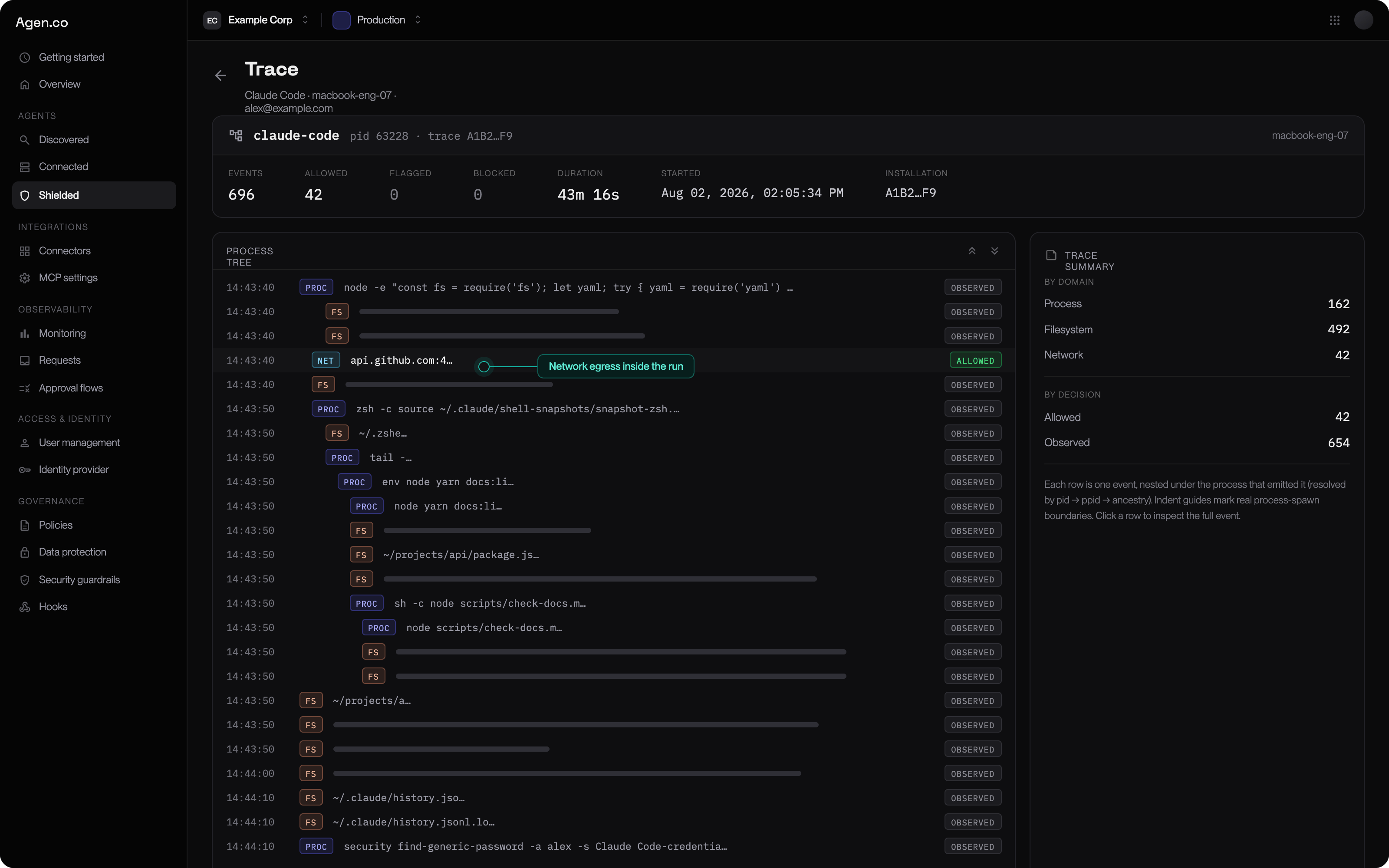
A trace — one agent run as a tree of process, file, and network events, each with its decision.
Phase 5 — Promote to enforcement
Promote one rule at a time. A rule’s own mode overrides the fleet default, so you can leave everything inmonitor and turn on exactly one rule.
For each rule:
- Promote it to
enforcein the Frontegg Portal. - Wait a full working day.
- Check the Frontegg Portal for blocks against that rule.
- Legitimate blocks mean the rule is too broad — narrow it and repeat.
monitor to audit — deny rules block, anything unmatched is still allowed.
Move to enforce, where only explicitly permitted activity is allowed, only when
your allow rules genuinely cover normal work.
See Enforcement modes for the exact
semantics of each mode.
Keeping it running
The loop does not stop after the first enforced rule.Common mistakes
- Starting in
enforce. You will block legitimate work you did not know existed, and lose the room to iterate. - Broad global rules. “No agent may run
curl” breaks more than it protects. Scope to the agent and the specific case. - Skipping the pilot. macOS approval behavior varies with your MDM and any other security software present. Find that out on 5 machines, not 200.
- Promoting several rules at once. When something breaks you will not know which one did it.
- Treating monitor as “not secure yet”. Visibility into what your AI agents are doing is already more than most organizations have.
Next
Enforcement modes
Exact semantics of monitor, audit, and enforce.
MDM deployment
Zero-touch rollout with no prompts on the endpoint.
Rules and policy
Building a rule out of grants, and getting it to the fleet.
Telemetry
The evidence every phase above depends on.